In This Article:
Verifying my Email & Phone number
Anniversary Check Verification
Verifying my Email & Phone number
Why do I need to verify my contact details?
We want to make sure the details you used to register your account with us are correct, so the account is kept secure and we go to the right place when we need to get in touch with you.
I haven't received an email or a text. What do I do?
- If you haven't received an email or a text, please make sure your email address and phone number are correct.
- If you haven't received an email with the 6-digit verification code, please check your spam folder/junk folder.
- If it's not in your spam folder/junk folder, click resend code and the system will resend the code to your email address.
- For phone number verification, please check that your phone hasn't got an automatic spam filter on your messages.
- If you haven't received an SMS with the 6-digit verification code, click resend code and the system will resend the code to your phone number.
If you've still had no luck, then please contact us using the 'Contact Verification Chat' button below and speak to one of our team who will be able to assist you.
Contact Verification ChatI made a typo when I entered my email address/I used an old email address, how can I fix this?
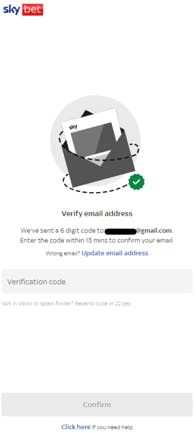
Don't panic! If you have entered in an incorrect detail when registering, all you need to do is click the Update Email Address button on the Email Verification screen > Enter your new email address > You'll get the code sent to the new address.
I added the wrong phone number, can I fix this too?
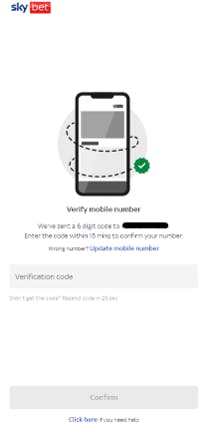
Yes, you can. Click the update phone number > Enter your new phone number > You'll get the code sent to your mobile.
I didn't enter my code within 15 minutes, what happens now?
If you didn't enter your code within the 15 minutes, you'll be able to request a new code.
I've verified by number and email, and I still can't access my account?
This can happen. You may be required to provide additional information to us. If the information isn't clear on the screen you see after you've verified your details, please contact us and we can help!
I've tried to verify my email/phone number multiple times; I've received the code and it's not accepting it.
If you have received the 6-digit verification code and it's not allowing you to proceed with registration after multiple attempts, don't worry - we can assist you by clicking the contact us button below.
I've verified my email and phone number when I registered, I've updated them since, Do I need to verify again?
If you update either your phone number/email address or both, you will be required to verify them again to ensure account security.
It's not allowing me to update my phone number/email address.
If you are unable to update your phone number or email address, please contact us.
I don't want to verify my details, what do I do?
Verification of phone number and email is a mandatory step in registering an account with us. This is common across a vast number of businesses that require registration. Unfortunately, you will not be able to use your account, deposit funds or place bets until it's completed.
I don't want to be bothered with promotions or offers so I don't want to verify.
During Registration, you will be asked for your preferences regarding Marketing & Promotions, verifying your contact details does not affect this preference. If you wish to change these at any point, you can post registration by navigating to My Account > My Details.
Will I be asked to Contact Verify every year?
If your saved email address and mobile phone number are already Contact Verified, you will not be asked to do this again. However, if either of these details are changed, you will need to complete this process again.
I've already got an account with another Flutter Brand, why do I need to verify?
Contact detail verification status is not currently shared across our brands, so you are required to verify if registering an account with Sky Betting & Gaming.
Are my details shared with any third parties?
Our data sharing policies can be found here.
Anniversary Check Verification
Why am I receiving this prompt?
We ask customers to confirm their contact details to help keep accounts secure. We also need accurate details to communicate with our customers effectively when needed.
Confirming your contact details doesn't change your saved marketing preferences.
How often will I receive this prompt?
You'll be asked to confirm your contact details once a year. As part of this process, you may be asked to verify your email address or phone number. This verifies the details belong to you and keeps your account secure.
Until you verify your email address and mobile number, you'll continue to see the prompt each time you log in.
Once completed, you won't be prompted again until the next annual review.
However, if you change your email or phone number at any time before the next annual review, you will be asked to Contact Verify your new details at the point of the update.
How long will this take to complete?
The process should only take a couple of minutes.
Once your details are verified on one device, the prompt will be cleared across all devices. Upon completion, you'll be taken into your account as normal.
What happens next?
After logging in, you'll be asked to review your contact details.
You can:
- Confirm your existing details if they're correct
- Update them if anything has changed
- Contact verify your email address and mobile phone number, if this is outstanding on your account
What details might be flagged as invalid?
We may ask you to update your information if it appears to be out of date or no longer working.
Updating these details helps prevent issues with account access or important communications.
How will my verified details be used?
Your verified contact details help us keep your account secure and accessible.
We'll use them to:
- Help you recover your account if you're ever locked out
- Send important security notifications
- Contact you about important account updates, where needed
Your information is handled in line with our data protection and privacy policies and is only used for legitimate account and security purposes.
I can't update my email, phone or address. What should I do?
If you're unable to complete the update, please contact our Support team via Live Chat using the 'Contact Verification Chat' button below.
Contact Verification Chat